> ## Documentation Index
> Fetch the complete documentation index at: https://docs.clix.so/llms.txt
> Use this file to discover all available pages before exploring further.
# iOS Live Activity
> Display real-time updates on the Lock Screen and Dynamic Island using Live Activities.
## Overview
Live Activities display your app's most current data on the iPhone Lock Screen and Dynamic Island, allowing users to monitor real-time updates at a glance. With Clix, you can remotely start and update Live Activities through push notifications.
Live Activities are available on iOS 16.1 and later. Dynamic Island is available on iPhone 14 Pro
and later models.
## Prerequisites
Before setting up Live Activities, ensure the following requirements are met:
- [Complete Clix iOS SDK setup](/sdk-quickstart-ios)
-
Clix iOS SDK version 1.7.0 or later
- Xcode 14.0 or later
- [Complete Clix React Native SDK setup](/sdk-quickstart-react-native)
-
Clix React Native SDK version 1.3.0 or later
- Xcode 14.0 or later
## Setup Guide
Create a Widget Extension to host your Live Activity UI.
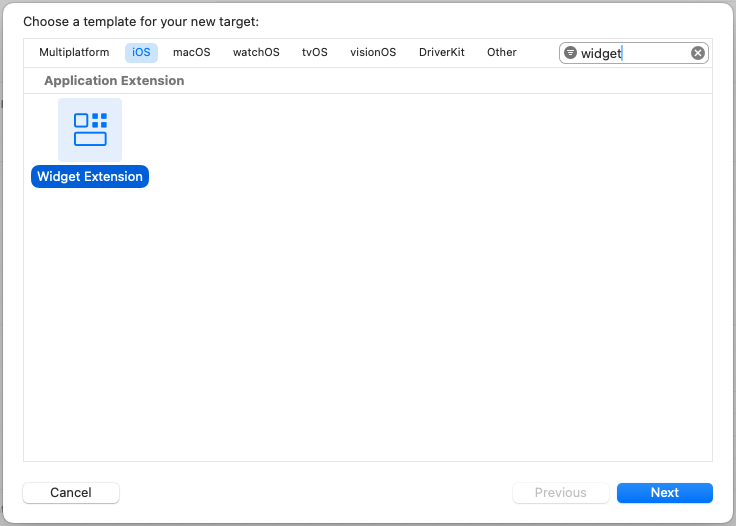
1. In Xcode, go to **File > New > Target**.
2. Search for **Widget Extension** and select it.
3. Click **Next**.
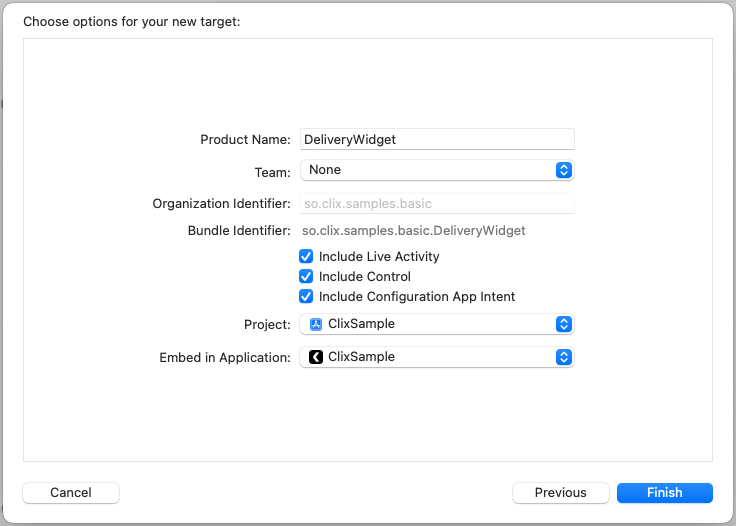
 4. Enter a name for your widget (e.g., `DeliveryWidget`).
5. **Check "Include Live Activity"** to generate the Live Activity template.
6. Click **Finish**.
4. Enter a name for your widget (e.g., `DeliveryWidget`).
5. **Check "Include Live Activity"** to generate the Live Activity template.
6. Click **Finish**.
 When the "Activate scheme?" dialog appears, select **Don't Activate** to continue using your main app scheme.
Enable Live Activities support in your main app's Info.plist.
1. Open your main app target's **Info.plist**.
2. Add a new key: `NSSupportsLiveActivities`
3. Set the value to **YES** (Boolean).
When the "Activate scheme?" dialog appears, select **Don't Activate** to continue using your main app scheme.
Enable Live Activities support in your main app's Info.plist.
1. Open your main app target's **Info.plist**.
2. Add a new key: `NSSupportsLiveActivities`
3. Set the value to **YES** (Boolean).
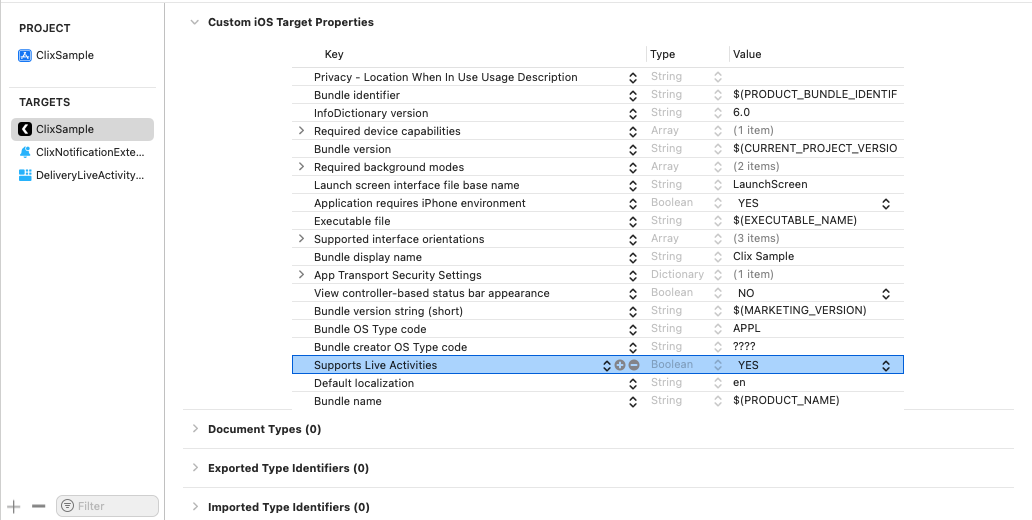 Alternatively, add this to your Info.plist source:
```xml theme={null}
NSSupportsLiveActivities
```
Define the data structure for your Live Activity. `ActivityAttributes` contains static data that doesn't change, while `ContentState` holds dynamic data that updates in real-time.
```swift DeliveryAttributes.swift theme={null}
import ActivityKit
import Foundation
struct DeliveryAttributes: ActivityAttributes {
// Static data - set when Live Activity starts
public struct ContentState: Codable, Hashable {
// Dynamic data - updates in real-time
var currentStatus: String
var estimatedArrival: Date
var distanceRemaining: Double
}
// Static attributes
var orderNumber: String
var driverName: String
var restaurantName: String
}
```
The `ActivityAttributes` struct name (e.g., `DeliveryAttributes`) must match the `attributes_type` value you send via the API.
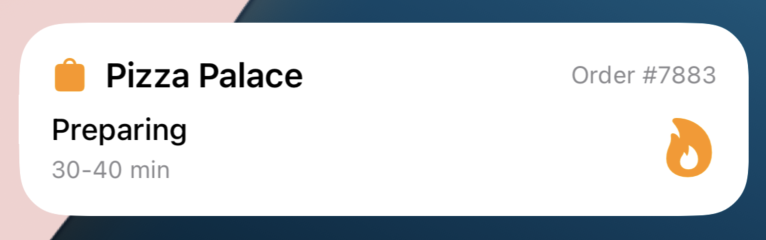
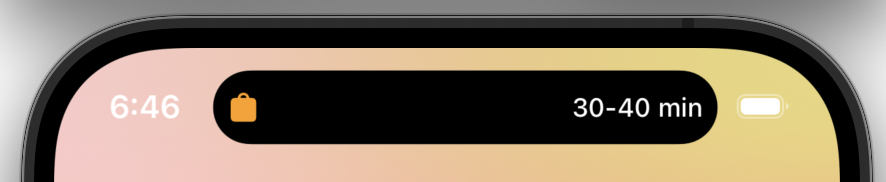
Implement the UI for your Live Activity. This includes the Lock Screen view and Dynamic Island presentations.
```swift DeliveryLiveActivity.swift theme={null}
import ActivityKit
import SwiftUI
import WidgetKit
struct DeliveryLiveActivity: Widget {
var body: some WidgetConfiguration {
ActivityConfiguration(for: DeliveryAttributes.self) { context in
// Lock Screen / Banner UI
LockScreenView(context: context)
} dynamicIsland: { context in
DynamicIsland {
// Expanded view (long press)
DynamicIslandExpandedRegion(.leading) {
Label(context.attributes.driverName, systemImage: "person.circle")
}
DynamicIslandExpandedRegion(.trailing) {
Text(context.state.estimatedArrival, style: .timer)
}
DynamicIslandExpandedRegion(.bottom) {
Text(context.state.currentStatus)
.font(.headline)
}
} compactLeading: {
// Compact leading (pill left side)
Image(systemName: "box.truck.fill")
} compactTrailing: {
// Compact trailing (pill right side)
Text(context.state.estimatedArrival, style: .timer)
} minimal: {
// Minimal (when multiple activities)
Image(systemName: "box.truck.fill")
}
}
}
}
struct LockScreenView: View {
let context: ActivityViewContext
var body: some View {
VStack(alignment: .leading, spacing: 12) {
HStack {
Image(systemName: "box.truck.fill")
.foregroundColor(.blue)
Text(context.attributes.restaurantName)
.font(.headline)
Spacer()
Text("Order #\(context.attributes.orderNumber)")
.font(.caption)
.foregroundColor(.secondary)
}
Text(context.state.currentStatus)
.font(.subheadline)
HStack {
Text("Driver: \(context.attributes.driverName)")
Spacer()
Text("ETA: ")
Text(context.state.estimatedArrival, style: .time)
}
.font(.caption)
}
.padding()
}
}
```
Alternatively, add this to your Info.plist source:
```xml theme={null}
NSSupportsLiveActivities
```
Define the data structure for your Live Activity. `ActivityAttributes` contains static data that doesn't change, while `ContentState` holds dynamic data that updates in real-time.
```swift DeliveryAttributes.swift theme={null}
import ActivityKit
import Foundation
struct DeliveryAttributes: ActivityAttributes {
// Static data - set when Live Activity starts
public struct ContentState: Codable, Hashable {
// Dynamic data - updates in real-time
var currentStatus: String
var estimatedArrival: Date
var distanceRemaining: Double
}
// Static attributes
var orderNumber: String
var driverName: String
var restaurantName: String
}
```
The `ActivityAttributes` struct name (e.g., `DeliveryAttributes`) must match the `attributes_type` value you send via the API.
Implement the UI for your Live Activity. This includes the Lock Screen view and Dynamic Island presentations.
```swift DeliveryLiveActivity.swift theme={null}
import ActivityKit
import SwiftUI
import WidgetKit
struct DeliveryLiveActivity: Widget {
var body: some WidgetConfiguration {
ActivityConfiguration(for: DeliveryAttributes.self) { context in
// Lock Screen / Banner UI
LockScreenView(context: context)
} dynamicIsland: { context in
DynamicIsland {
// Expanded view (long press)
DynamicIslandExpandedRegion(.leading) {
Label(context.attributes.driverName, systemImage: "person.circle")
}
DynamicIslandExpandedRegion(.trailing) {
Text(context.state.estimatedArrival, style: .timer)
}
DynamicIslandExpandedRegion(.bottom) {
Text(context.state.currentStatus)
.font(.headline)
}
} compactLeading: {
// Compact leading (pill left side)
Image(systemName: "box.truck.fill")
} compactTrailing: {
// Compact trailing (pill right side)
Text(context.state.estimatedArrival, style: .timer)
} minimal: {
// Minimal (when multiple activities)
Image(systemName: "box.truck.fill")
}
}
}
}
struct LockScreenView: View {
let context: ActivityViewContext
var body: some View {
VStack(alignment: .leading, spacing: 12) {
HStack {
Image(systemName: "box.truck.fill")
.foregroundColor(.blue)
Text(context.attributes.restaurantName)
.font(.headline)
Spacer()
Text("Order #\(context.attributes.orderNumber)")
.font(.caption)
.foregroundColor(.secondary)
}
Text(context.state.currentStatus)
.font(.subheadline)
HStack {
Text("Driver: \(context.attributes.driverName)")
Spacer()
Text("ETA: ")
Text(context.state.estimatedArrival, style: .time)
}
.font(.caption)
}
.padding()
}
}
```
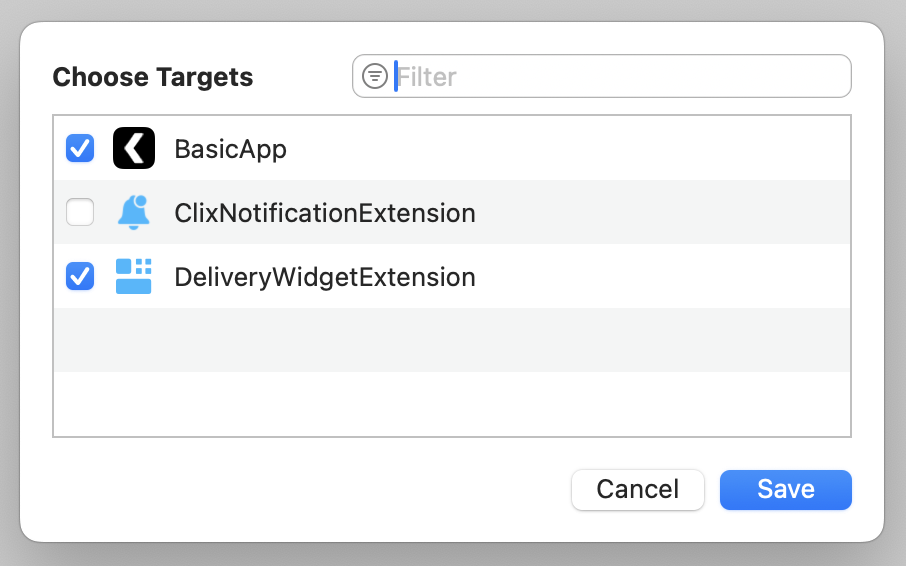
 Make your `DeliveryAttributes.swift` file accessible to both the main app and widget extension.
1. Select `DeliveryAttributes.swift` in the Project Navigator.
2. In the right sidebar, locate the **Target Membership** section under the File Inspector.
3. Enable the checkbox for your **main app target**.
4. Verify that both your main app and widget extension targets are now checked.
Make your `DeliveryAttributes.swift` file accessible to both the main app and widget extension.
1. Select `DeliveryAttributes.swift` in the Project Navigator.
2. In the right sidebar, locate the **Target Membership** section under the File Inspector.
3. Enable the checkbox for your **main app target**.
4. Verify that both your main app and widget extension targets are now checked.
 The main app needs access to `DeliveryAttributes` for the `Clix.LiveActivity.setup()` call. The widget UI file only needs to be in the widget extension target.
Register your `ActivityAttributes` type with Clix to enable remote Live Activity starts.
Add the setup call in your `AppDelegate.swift` after initializing Clix:
```swift AppDelegate.swift {2, 20-22} theme={null}
import UIKit
import Clix
import FirebaseCore
class AppDelegate: ClixAppDelegate {
override func application(_ application: UIApplication,
didFinishLaunchingWithOptions launchOptions: [UIApplication.LaunchOptionsKey: Any]?) -> Bool {
FirebaseApp.configure()
Task {
await Clix.initialize(
config: ClixConfig(
projectId: YOUR_PROJECT_ID,
apiKey: YOUR_PUBLIC_API_KEY
)
)
// Register Live Activity attributes type (iOS 16.1+)
if #available(iOS 16.1, *) {
Clix.LiveActivity.setup(DeliveryAttributes.self)
}
}
return super.application(application, didFinishLaunchingWithOptions: launchOptions)
}
}
```
If your React Native app uses `AppDelegate.swift`, add the setup call directly:
```swift AppDelegate.swift {3, 14-16} theme={null}
import UIKit
import Firebase
import clix_react_native_sdk
@main
class AppDelegate: UIResponder, UIApplicationDelegate {
func application(_ application: UIApplication,
didFinishLaunchingWithOptions launchOptions: [UIApplication.LaunchOptionsKey: Any]?) -> Bool {
FirebaseApp.configure()
// Register Live Activity attributes type (iOS 16.1+)
if #available(iOS 16.1, *) {
ClixLiveActivity.setup(DeliveryAttributes.self)
}
return true
}
// ... rest of AppDelegate
}
```
If your React Native app uses `AppDelegate.mm`, you need to create a Swift helper file first.
**Step 1:** Create `LiveActivitySetup.swift` in your project:
```swift LiveActivitySetup.swift {2, 6-8} theme={null}
import Foundation
import clix_react_native_sdk
@objc public class LiveActivitySetup: NSObject {
@objc public static func setup() {
if #available(iOS 16.1, *) {
ClixLiveActivity.setup(DeliveryAttributes.self)
}
}
}
```
**Step 2:** Make sure this file has target membership for your main app.
**Step 3:** Call the helper from your `AppDelegate.mm`:
```objectivec AppDelegate.mm {6, 18} theme={null}
#import "AppDelegate.h"
#import
#import
// Import Swift bridging header
#import "YourApp-Swift.h"
@implementation AppDelegate
- (BOOL)application:(UIApplication *)application didFinishLaunchingWithOptions:(NSDictionary *)launchOptions
{
[FIRApp configure];
self.moduleName = @"YourApp";
self.initialProps = @{};
// Register Live Activity
[LiveActivitySetup setup];
return [super application:application didFinishLaunchingWithOptions:launchOptions];
}
// ... rest of AppDelegate
@end
```
`Clix.LiveActivity.setup()` automatically registers the push-to-start token with Clix servers, enabling remote Live Activity starts.
## Triggering Live Activities
Once setup is complete, you can start Live Activities remotely using the Clix API.
For detailed API reference, see [Start Live Activities API](/api-reference/endpoint/live-activities:start).
## Additional Resources
Official Apple documentation for implementing Live Activities.
Check out the SDK source code and sample projects.
Complete iOS SDK setup guide.
Complete React Native SDK setup guide.
The main app needs access to `DeliveryAttributes` for the `Clix.LiveActivity.setup()` call. The widget UI file only needs to be in the widget extension target.
Register your `ActivityAttributes` type with Clix to enable remote Live Activity starts.
Add the setup call in your `AppDelegate.swift` after initializing Clix:
```swift AppDelegate.swift {2, 20-22} theme={null}
import UIKit
import Clix
import FirebaseCore
class AppDelegate: ClixAppDelegate {
override func application(_ application: UIApplication,
didFinishLaunchingWithOptions launchOptions: [UIApplication.LaunchOptionsKey: Any]?) -> Bool {
FirebaseApp.configure()
Task {
await Clix.initialize(
config: ClixConfig(
projectId: YOUR_PROJECT_ID,
apiKey: YOUR_PUBLIC_API_KEY
)
)
// Register Live Activity attributes type (iOS 16.1+)
if #available(iOS 16.1, *) {
Clix.LiveActivity.setup(DeliveryAttributes.self)
}
}
return super.application(application, didFinishLaunchingWithOptions: launchOptions)
}
}
```
If your React Native app uses `AppDelegate.swift`, add the setup call directly:
```swift AppDelegate.swift {3, 14-16} theme={null}
import UIKit
import Firebase
import clix_react_native_sdk
@main
class AppDelegate: UIResponder, UIApplicationDelegate {
func application(_ application: UIApplication,
didFinishLaunchingWithOptions launchOptions: [UIApplication.LaunchOptionsKey: Any]?) -> Bool {
FirebaseApp.configure()
// Register Live Activity attributes type (iOS 16.1+)
if #available(iOS 16.1, *) {
ClixLiveActivity.setup(DeliveryAttributes.self)
}
return true
}
// ... rest of AppDelegate
}
```
If your React Native app uses `AppDelegate.mm`, you need to create a Swift helper file first.
**Step 1:** Create `LiveActivitySetup.swift` in your project:
```swift LiveActivitySetup.swift {2, 6-8} theme={null}
import Foundation
import clix_react_native_sdk
@objc public class LiveActivitySetup: NSObject {
@objc public static func setup() {
if #available(iOS 16.1, *) {
ClixLiveActivity.setup(DeliveryAttributes.self)
}
}
}
```
**Step 2:** Make sure this file has target membership for your main app.
**Step 3:** Call the helper from your `AppDelegate.mm`:
```objectivec AppDelegate.mm {6, 18} theme={null}
#import "AppDelegate.h"
#import
#import
// Import Swift bridging header
#import "YourApp-Swift.h"
@implementation AppDelegate
- (BOOL)application:(UIApplication *)application didFinishLaunchingWithOptions:(NSDictionary *)launchOptions
{
[FIRApp configure];
self.moduleName = @"YourApp";
self.initialProps = @{};
// Register Live Activity
[LiveActivitySetup setup];
return [super application:application didFinishLaunchingWithOptions:launchOptions];
}
// ... rest of AppDelegate
@end
```
`Clix.LiveActivity.setup()` automatically registers the push-to-start token with Clix servers, enabling remote Live Activity starts.
## Triggering Live Activities
Once setup is complete, you can start Live Activities remotely using the Clix API.
For detailed API reference, see [Start Live Activities API](/api-reference/endpoint/live-activities:start).
## Additional Resources
Official Apple documentation for implementing Live Activities.
Check out the SDK source code and sample projects.
Complete iOS SDK setup guide.
Complete React Native SDK setup guide.